

How We Built a Natural-Language Workday Orchestration Copilot
An experiment in natural-language Workday delivery
Overview
This started as a simple Workday integration problem — but quickly turned into an experiment: could we design and deliver a full orchestration mostly through natural language?
We didn’t set out to build something perfect. The goal was to see how far we could push this approach in a real scenario: synchronize a Time Off Service Date from worker data into a custom object, safely and with enough observability to diagnose failures.
What made it interesting was the delivery method. We were able to design, validate, build, deploy, and debug the orchestration primarily through natural language, using a set of specialized AI skills instead of a single generic assistant.
In practice, this felt like recreating a Workday Orchestration Copilot.
Workday Orchestration is a low-code integration tool built into the Workday platform that lets you design and automate multi-step business processes using a visual flow editor. If you’re not familiar with it, Workday’s integration overview is a good starting point before reading further.
Why This Idea Became Timely
The trigger was not abstract enthusiasm about AI. It was a concrete platform shift.
When Workday made the updated Workday Developer CLI generally available, it changed the practical shape of the delivery workflow. According to Workday’s announcement, WDCLI became the unified command line interface to build, test, validate, and deploy Workday Integration and Extend apps across the application lifecycle. The official announcement also emphasized core capabilities such as uploading apps to App Hub, downloading them, deploying them to tenants, promoting them across environments, and authenticating programmatically through a secure system user model.
That mattered because it created a credible terminal-centered delivery surface for Workday builders. Once Workday itself made the CLI lifecycle real, the next logical question was straightforward: if the platform can now be managed through the terminal, can a natural-language agent stack become the operating layer that drives that lifecycle?
That is the moment when this project stopped looking like a simple orchestration exercise and started looking like an experiment in building an equivalent of a Workday Orchestration Copilot.
Sources:
- Workday forum announcement: Product Update: Workday Developer CLI now Generally Available
- Product demo: Workday CLI GA Demo on Vimeo
The Skill Stack
The workflow depended on a small set of focused skills. Each one owned a distinct part of the problem, and that separation is what made the whole system reliable.
wdcli
This skill is the delivery operator. It knows the Workday Developer CLI lifecycle, the order of commands, the difference between safe read-only commands and state-changing commands, and the practical checks needed after uploads or deploys.
In this project, that mattered because WDCLI output was not always trustworthy on its own. We observed cases where wdcli app upload printed both a success message and a failure message while still creating a new App Hub version. The skill therefore evolved from “knows the commands” into “treats App Hub state as the source of truth.” That is the kind of operational learning a generic assistant usually lacks.
wd-wql
This skill is the discovery and query-design layer. It explains how to think about WQL as a versioned REST service, how to discover data sources and fields from metadata instead of guessing aliases, and when WQL is the right tool versus REST or SOAP.
That was essential because the orchestration could not be designed safely until we knew what the tenant actually exposed. A large part of Workday delivery risk comes from false assumptions about aliases, data sources, and field availability. wd-wql reduces that risk by pushing the workflow toward metadata-first reasoning.
wd-wql-executor
This skill is the bridge between design and reality. It turns a theoretical WQL statement into a live tenant test. In other words, it closes the loop between “this query looks correct” and “this query actually returns the rows we need.”
That distinction matters more than it sounds. In many integration efforts, people stop at syntax. In this workflow, the executor skill forced us to validate that the query really worked in the tenant and that the result shape aligned with the orchestration logic.
wd-api-test-runner
This skill validates integration plumbing. It is the quickest way to separate credential issues, OAuth failures, service availability problems, and path-level mistakes from orchestration design problems.
That separation was critical in this story. Before blaming the orchestration, we used API-level checks to confirm whether the service path, authentication, and endpoint behavior were coherent. This prevented a common failure mode in Workday projects: debugging the wrong layer.
wd-orchestration
This skill owns the orchestration design language itself. It understands node types, _type and _value patterns, expression syntax, upstream scoping, loop behavior, error handling, integration messages, and reusable orchestration frameworks such as OSK.
That made it the core reasoning engine for the project. It was used to shape the main flow, structure the suborchestration, improve runtime messages, and diagnose the runtime 404 when the build itself looked successful.
Why the Skill Split Matters
This separation ended up being key in practice.
- query design is not the same problem as query execution
- API health is not the same problem as orchestration JSON
- app packaging is not the same problem as runtime diagnosis
The skill stack worked because each skill had a narrow contract. Together, they formed a practical agent toolchain for Workday delivery without pretending that one prompt could understand every layer equally well.
From Business Need to Working Design
The first step was not code generation. It was tenant discovery.
Using the WQL-oriented skills, we confirmed which data source and aliases actually existed in the tenant, how the Time Off Service Date could be read, and what the custom object field looked like from a retrieval perspective. This mattered because Workday integrations often fail when teams assume the tenant matches generic examples.
Once the data contract was clearer, the orchestration skill helped translate the requirement into a concrete flow:
- read worker rows through WQL
- loop through each result
- compare source and target values
- call a suborchestration only when an update is required
- emit integration messages for traceability
This was not just JSON generation. It required understanding Workday execution paths, scoping rules, subflow boundaries, and API node behavior.
API Validation Before Blind Orchestration
Before trusting the orchestration, we validated the API direction directly.
Using API test tooling, we confirmed that the custom object REST service was the correct update path, that the payload shape was valid, and that the service expected worker.id rather than employeeID. That separation was important: it let us distinguish an orchestration problem from a service-contract problem.
In other words, the project moved forward because we did not guess. We validated each layer independently.
WDCLI as Delivery Layer
Once the orchestration was in place, wdcli became the delivery mechanism.
This introduced its own lessons:
- the real app root had to be identified correctly
- project documentation folders were not enough; the actual Workday app source had to contain
appManifest.json wdcli app uploadcould produce contradictory terminal output- the real source of truth was App Hub version state and build state, not the terminal message alone
wdcli app deploycould fail with a CLI-side exception while still leaving ambiguity about the real platform state
That changed the workflow. Instead of assuming the CLI output was authoritative, we started verifying every upload through wdcli app versions and every build through wdcli app builds.
It also exposed a useful architectural consequence of Workday’s own WDCLI positioning. The announcement explicitly framed WDCLI as the interface for automating build and testing pipelines and for managing the end-to-end lifecycle of apps through command-line workflows. Once that became true, it made sense to design the surrounding AI layer around those same stages:
- discover
- validate
- build
- upload
- deploy
- inspect
- debug
That is one reason this story is more than a one-off prompt experiment. It is aligned with the delivery surface Workday itself chose to expose.
Where the Story Became Interesting
The orchestration compiled successfully. It uploaded successfully. The build passed.
Then runtime behavior told a different story.
The integration messages initially suggested that records were being updated, but when we checked the target data in Workday, the field remained blank. This is where the orchestration skill and the debugging approach became critical.
We improved the integration messages so they no longer reported success unconditionally. Instead, they logged:
- the worker identifier
- the source TOSD value
- the HTTP response status code
- the raw API response body
That one improvement changed the debugging process completely.
The 404 Root Cause
The next execution exposed the real issue immediately.
The API was returning a 404 with a response indicating that the tenant alias had effectively been treated as part of the resource path. The problem was not the worker reference, and it was not the payload. The issue was the REST path itself.
The tenant name had been hardcoded into the custom object API path:
/customObject/v2/<tenant>/customObjects/timeOffServiceDate?updateIfExists=trueInside a tenanted Workday orchestration call, that was incorrect. The orchestration was already running in tenant context, so the tenant name should not have appeared inside the REST path.
The fix was to remove the tenant segment and use the tenant-relative service path:
/customObject/v2/customObjects/timeOffServiceDate?updateIfExists=trueThis was a strong example of why build success is not enough. The orchestration compiled perfectly and still failed at runtime because the request path was semantically wrong.
It was also a strong example of why specialized skills outperform generic summarization. The orchestration skill knew to improve the logging around responseStatusCode and response.toString(). Once those details were visible in the integration event, the runtime error stopped being mysterious.
The Final Orchestration
After tenant discovery, API validation, iterative debugging, and the REST path fix, this is the orchestration that runs in production.
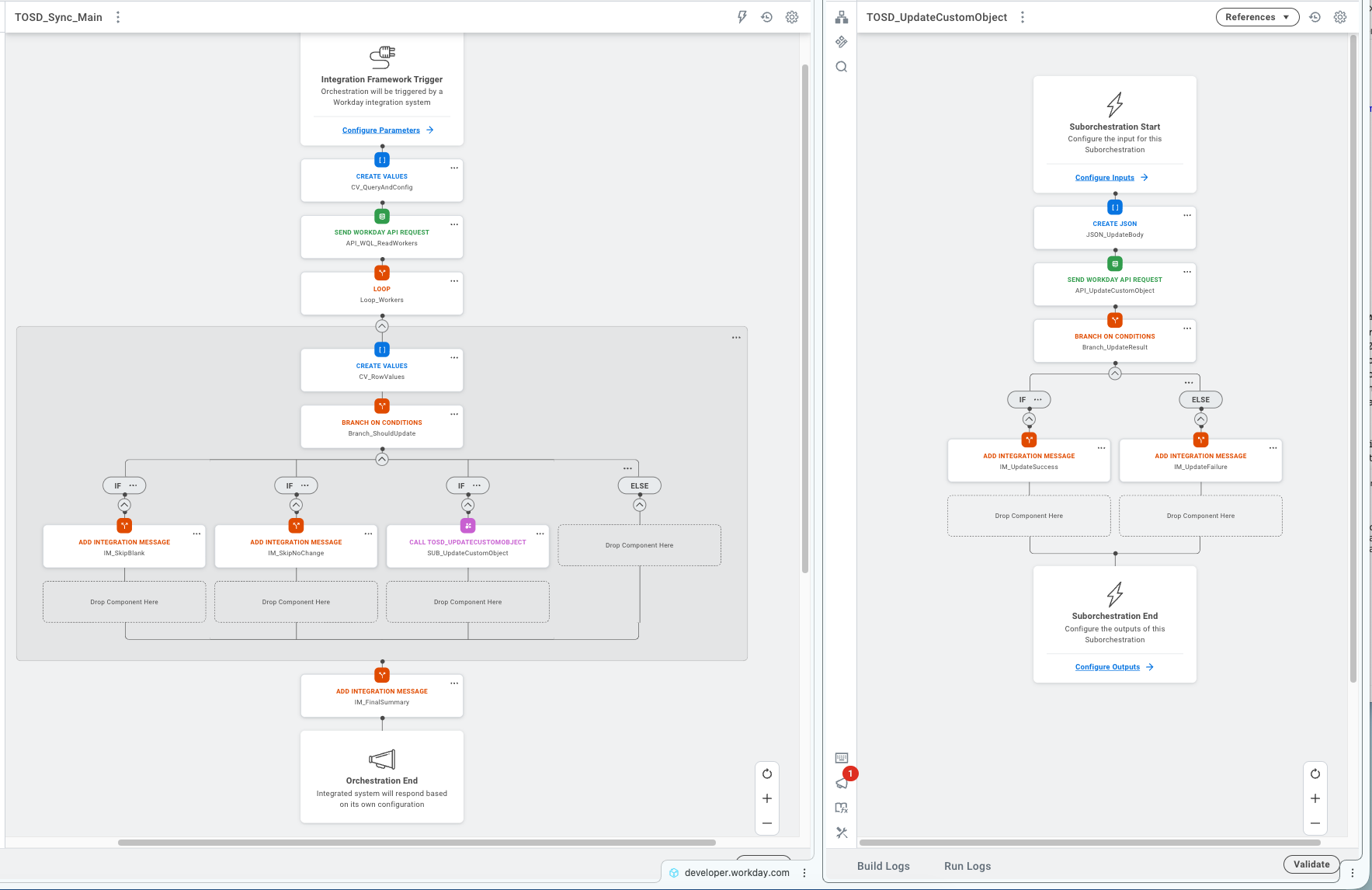
The main flow reads workers through WQL, loops through each row, compares source and target values, and delegates updates to the suborchestration only when needed. The suborchestration handles the REST call, branches on the response, and emits structured integration messages in both cases — success and failure.
What the Package Shows
The orchestration code, app-root snapshot, and the five skills used in this project are available on request. The point is not simply to say “AI helped.” The point is to show how the workflow can be read, challenged, and reproduced by another engineer.
Why This Feels Like a Copilot Story
What makes this worth documenting is not only the fix itself. It is the process.
We used natural language to coordinate:
- data-source discovery
- WQL query design
- WQL execution
- API validation
- orchestration design
- runtime debugging
- packaging and deployment through WDCLI
That is effectively a domain-specific copilot workflow for Workday Extend.
Instead of asking a generic model to improvise across every layer, we used specialized skills that each carried operational knowledge about one part of the platform. The result was more reliable reasoning, faster diagnosis, and fewer false assumptions.
The Bigger Picture
What this experiment points to is a pattern, not a one-off.
Natural language becomes much more valuable when it is connected to specialized skills, verifiable tools, and tenant-aware workflows. In that setup, AI is not just generating text. It is helping perform real delivery work across design, validation, deployment, and debugging.
The timing matters too. Workday’s WDCLI GA milestone created the practical surface area for this kind of experiment to matter. Once the platform lifecycle can be driven credibly from the terminal, it becomes reasonable to place a natural-language orchestration layer on top of it.
That is why this story is bigger than a single orchestration. It shows how an agent-based toolchain can function as a practical Workday Orchestration Copilot for builders using Codex, Claude, Gemini, OpenCode, or similar agent environments.
We’ll keep exploring this space — it feels like we’re just scratching the surface of what orchestration + natural language could become in Workday.